Get started with Komashi
First create your provider. You describe your business once, and Komashi creates your branded workspace together with your first service.
Then work through the Setup guide in the left sidebar of the Control Center. Its Account setup list has five steps, and the first one is already done when your provider is created.
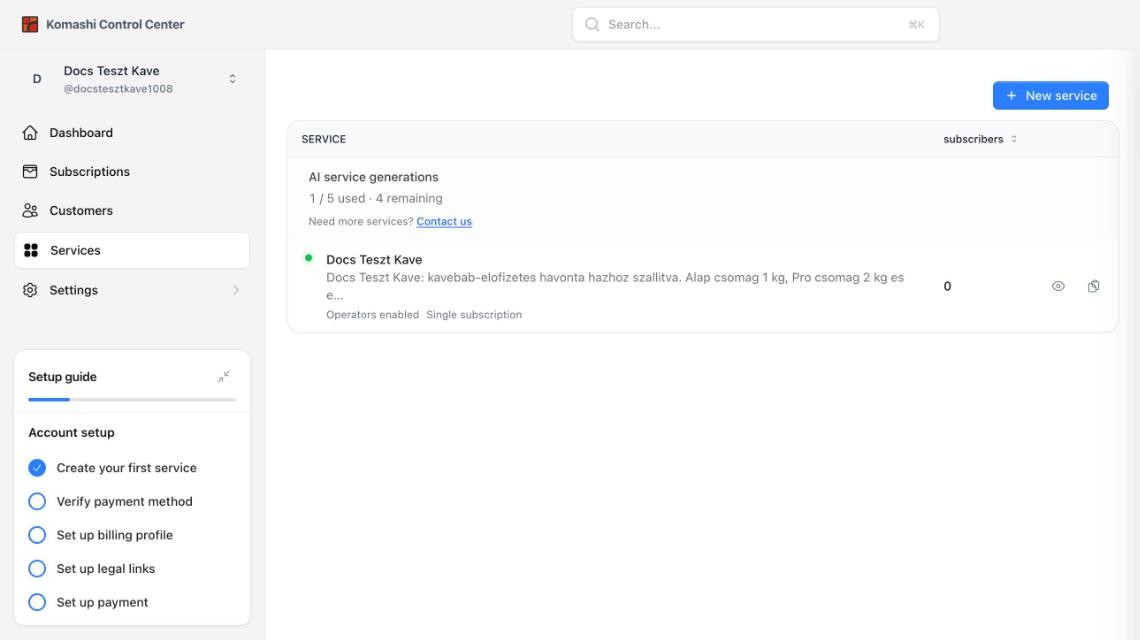
Account setup
- Create your first service — done for you during provider creation. Review the generated prices and plans. Full guide
- Verify payment method — add a billing card for your Komashi fees. Full guide
- Set up billing profile — add your legal billing details. Full guide
- Set up legal links — add your privacy policy and terms links. Full guide
- Set up payment — enable payment methods so customers can pay you. Full guide
Each step is ticked automatically when you finish it, and the progress bar fills up. Collapse the guide with the icon in its top-right corner.
Complete all five steps to start selling on Komashi.